Nowhere does music play as reliably as in the car, and nowhere is the temptation greater to open the streaming service again, simply because it shows up so nicely on the car display. Yet your own collection from a Navidrome server, from Jellyfin or from a NAS works under CarPlay too. You just need to know how the system ticks, which apps can do it, and where the limits are.
How CarPlay apps really work
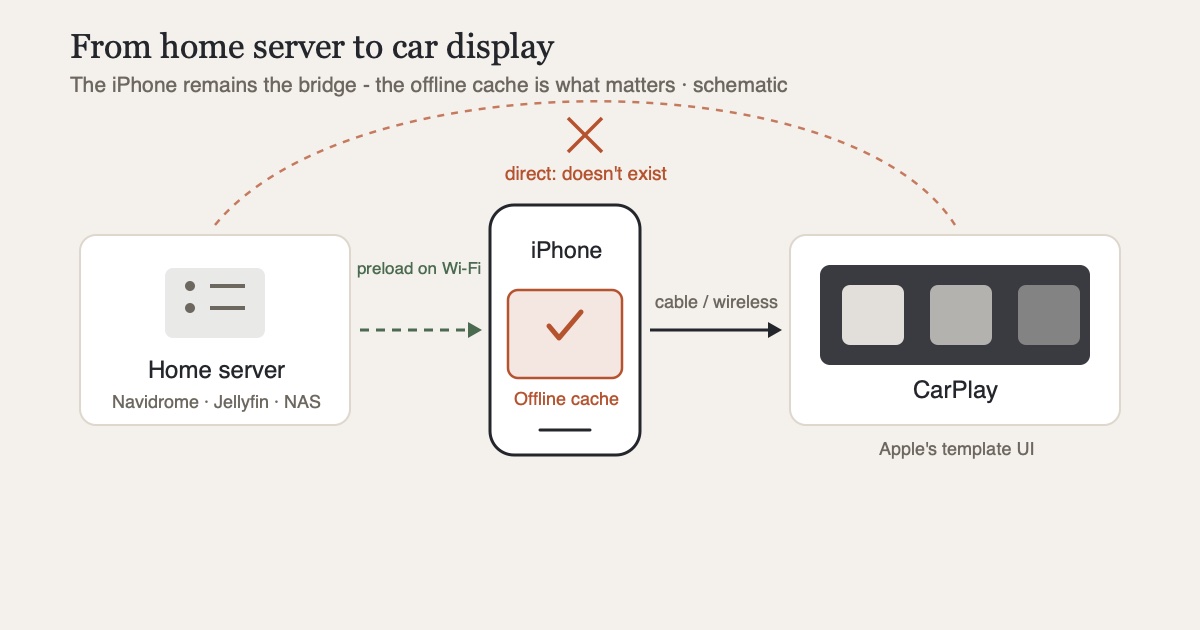
The most important thing first: CarPlay apps are not mirrored iPhone apps. Audio apps only deliver data (lists, titles, covers) to a template system provided by Apple, which builds the interface on the car display from it. That's why all music apps look practically identical under CarPlay, from billion-dollar corporations to indie clients. This is deliberate: uniform operation, minimal distraction.
The limits follow from the template approach. Apple caps the list length and the depth of navigation, because the car display is not meant for endlessly digging through a 40,000-track library. On top of that, the developer has to implement CarPlay actively and request a dedicated entitlement from Apple. So the fact that a player is great on the iPhone says nothing about whether it appears in the car at all.
What works today
The good news: for every common server software there are now CarPlay-capable clients.
- Multiple sources in one app: CLAUDIO, a privacy-focused player, brings music, audiobooks and podcasts from Jellyfin, Navidrome, NAS/SMB, WebDAV, SFTP and Audiobookshelf onto one shared CarPlay interface (with Ultra or Pro+). It plays whatever is stored locally or sits in the offline cache; it does not stream from the server in the car, so it relies on exactly the path this post recommends further down. Disclosure: CLAUDIO is my own app
- Navidrome/Subsonic: Amperfy (free, open source) ships CarPlay including Siri support; play:Sub (one-time purchase) shows the play queue, bookmarks and genres under CarPlay. Details on both in Navidrome on the iPhone
- Jellyfin: community favorite Finamp can't do CarPlay in its stable release yet, but the redesign beta on TestFlight has had it since June 2026. Off the shelf from the App Store, Finer Player and Jellify, where CarPlay was a design goal from day one, deliver it today. The comparison is in Jellyfin music on the iPhone
What doesn't work (or only with caveats)
Streaming from your home server over the cellular network is the shakiest link in the setup. Under CarPlay, the iPhone remains the only bridge: server → cellular → iPhone → car. Every dead zone on a country road interrupts the music at exactly the moment nobody should be fiddling with a phone. And if your NAS is only reachable inside your home network, which is sensible from a security standpoint, you have no connection on the road anyway.
The answer in both cases is the same: offline caching. Practically all the apps mentioned can preload albums and playlists onto the iPhone; in CLAUDIO you download titles to the offline cache or pin them. What's stored locally plays in the car without network, without data usage and without dropouts; CarPlay doesn't notice the difference. Sync your car playlist once on Wi-Fi before a long drive, and dead zones are a non-issue.
Two smaller caveats remain. Voice control via Siri is usually limited to simple commands for third-party apps and depends on how well the app implements Siri media intents. The hit rate of a "play my album X" rarely reaches Apple Music levels. And search in large libraries remains constrained by the template limits: for the car, curated playlists and recently-played lists are the practical path, not leafing through a thousand albums.
The practical checklist
- Pick a client with CarPlay that fits your server (see above)
- Create a car playlist and make it available offline while on Wi-Fi
- Test once before the drive: airplane mode on, open the app. Whatever plays now will play in a dead zone too
- Include audiobooks and podcasts: half the battle on long hauls, and just as dead-zone-proof with cached files. In CLAUDIO they sit in the same app as your music
Conclusion
CarPlay and self-hosted music get along better than their reputation suggests, and the days when the car display was reserved for streaming services are over. The architecture does teach one clear lesson, though: the in-car experience depends on the offline cache on the iPhone far more than on the connection to the server. Keep that tended, and your own collection lands on the driving screen as conveniently as any subscription, just without the subscription.
If your music, audiobooks and podcasts live on several servers, CLAUDIO is the obvious choice for the car: one library for all sources, with CarPlay built on exactly this offline cache. It needs Ultra (subscription) or the one-time Pro+. For a single Navidrome library, Amperfy is the free alternative; for Jellyfin, Finer Player and Jellify deliver CarPlay today.
Sources
- Apple: CarPlay for developers, template approach, app categories and entitlement requirement
- Apple Developer Documentation: CPListTemplate, limits on list length and navigation depth
- GitHub: BLeeEZ/amperfy, open-source client for Ampache/Subsonic with CarPlay and Siri
- GitHub: Jellify-Music/App, Jellyfin player with CarPlay as a core design goal
- GitHub: Finamp releases, CarPlay support since version 0.9.24-beta (June 2026, redesign beta)
- App Store: play:Sub and Finer Player, CarPlay-capable clients for Subsonic and Jellyfin