Maker · 3D Printing & Smart Home
Build, print, connect.
My favorite playground between technology and craft. It reaches from small gift ideas and functional short runs to the connected smart home controls in my own house.
3D Printing
From model to object
From the shop to custom designs and print projects to picking the right material.
Shop
No printer of your own? No problem!
Together with a partner, I am building the shop Nerdwana with merchandise and gift items. Your favorite piece is missing? I print custom designs and short runs on request.
Services
What I offer
Merch & gifts
Ready-made pieces from the Nerdwana shop, for nerds and everyone who wants to become one.
Custom designs
Got your own idea? I model and print individual objects to your specifications.
Short runs
Several copies in consistent quality, produced on request.
Material database
An open collection of filaments and their properties that helps you pick the right material.
From the workshop
Print projects
A small selection of printed models. The designs are by the makers credited below.

Battery Beer Crate

Keepitcrab

Moon City 2.0
Material database
Choosing the right filament
A compact overview of the most common printing materials with their strengths, typical uses and usual temperature ranges. The temperatures are guide values and vary by manufacturer and printer.
| Material | Properties | Typical use | Nozzle / Bed |
|---|---|---|---|
| PLAPolylactide | Environmentally friendly & biodegradable, very easy to print. | Prototypes, decorative pieces, simple mechanical parts. | ~190-220 °C / 50-60 °C |
| PETGPET glycol | Good balance of strength & flexibility, resistant to moisture and chemicals. | Technical & functional applications. | ~230-250 °C / 70-85 °C |
| ABSAcrylonitrile butadiene styrene | High strength & impact resistance, heat resistant. | Functional prototypes, mechanical parts, enclosures. | ~230-250 °C / 90-110 °C |
| TPUThermoplastic polyurethane | Highly flexible & elastic, good wear resistance. | Flexible parts, protective cases, seals. | ~210-230 °C / 30-50 °C |
| NylonPolyamide (PA) | High strength & wear resistance, good chemical resistance. | Mechanically stressed parts, gears, bearings. | ~240-260 °C / 70-90 °C |
| PCPolycarbonate | Very high impact resistance & heat resistance, optically transparent. | Rugged, load-bearing parts. | ~260-300 °C / 90-120 °C |
| ResinSLA/DLP resin | Finest detail & smooth surfaces, UV-cured. | Jewelry, dental, miniatures. | UV curing |
| HIPSHigh Impact Polystyrene | Good mechanical properties, soluble in limonene. | Support material for ABS prints. | ~220-240 °C / 90-110 °C |
In detail
Filaments in detail: pros and cons
The four materials that end up on my spool holder most often: what they do well, where they get annoying, and what to watch when printing.
PLA: the easy default
Polylactide is the material almost everyone starts with, for good reason. It prints at low temperatures, barely warps and needs neither an enclosure nor special bed adhesion tricks. A good fit for decorative pieces, figurines, prototypes and simple mechanical parts indoors.
- Pros: very easy to print, hardly any warping, wide range of colors and blends, little odor, inexpensive.
- Cons: softens from around 60 °C (think car interior in summer), more brittle than PETG or ABS, a poor fit for outdoor use and sustained loads.
- When printing: keep the part cooling fan high so overhangs and details come out clean; store it dry, otherwise surface quality suffers.
PETG: the all-rounder for functional parts
PETG combines decent strength with a bit of flex and tolerates more heat than PLA. It suits brackets, containers and functional parts and lasts noticeably longer outdoors than PLA.
- Pros: tougher and more heat resistant than PLA, resistant to moisture and many chemicals, little warping.
- Cons: prone to stringing, the glossy surface shows every flaw, overhangs and bridges come out worse than with PLA.
- When printing: tune retraction and temperature against stringing, use less cooling than for PLA, keep the filament dry. On smooth build plates PETG sometimes sticks too well; a release agent protects the surface.
ASA and ABS: tough but demanding
Both are impact resistant and handle heat well, which makes them the first choice for mechanically stressed parts and enclosures. ASA is the UV-stable successor to ABS and the better pick for parts that live outside.
- Pros: high strength and impact resistance, heat resistant, easy to post-process (ABS can be smoothed with acetone vapor).
- Cons: warps heavily while cooling, hard to print reliably without an enclosure, noticeable fumes during printing.
- When printing: an enclosure and a heated bed are a must, avoid drafts and ventilate the room well, ideally one nobody spends much time in.
TPU: flexible and tough
TPU is rubbery and elastic yet wear resistant. A good fit for seals, protective cases, dampers and anything that should bend instead of breaking.
- Pros: highly elastic, very good layer adhesion, shrugs off impacts and abrasion.
- Cons: slow to print, prone to stringing, tricky to feed through Bowden extruders, supports are hard to remove.
- When printing: slow down considerably, keep retraction short, a direct-drive extruder helps; TPU absorbs moisture and needs dry storage.
Smart Home
A home that thinks along
My home automation runs strictly locally, without any forced cloud. Home Assistant sits at the center and brings devices, energy and routines together.
Home Assistant
Local hub for everything in the house: automations, dashboards and routines. It is data-frugal and independent of third-party clouds.
Modbus
Energy hardware connected via Modbus, so inverters, meters & co. are read out and controlled directly.
Local gateways
Devices run through local gateways on my own network instead of vendor clouds. That keeps them responsive and data-frugal, and they work even without internet.
PV with control
My own photovoltaic system with active energy management: appliances run when the sun supplies the power.
Project
A heat pump on its own bus
When the cloud gateway of my LG Therma V failed, an ESP32 went onto the RS485 terminal of the indoor unit: Modbus instead of vendor cloud. Since then the machine delivers its values locally to Home Assistant, and considerably more of them than the vendor app ever showed.
Wiring
An ESP32 board with an RS485 transceiver on the third-party controller terminal, flashed with ESPHome. It costs about 35 euros in parts and needs no cloud and no account.
Register map
There is no published register map for the unit, so it got mapped: 37 data points, backed by scanners, an observation mode and physics cross-checks, without ever writing blindly.
Refrigerant diagnostics
Two pressure registers and the vapour pressure curve of propane yield evaporation and condensation temperature, superheat and temperature lift. Those values are usually reserved for service tools.
Key figures
Electricity per heating degree day, consumption per kelvin of tank lift, compressor starts per day: honest efficiency and wear numbers instead of gut feeling.
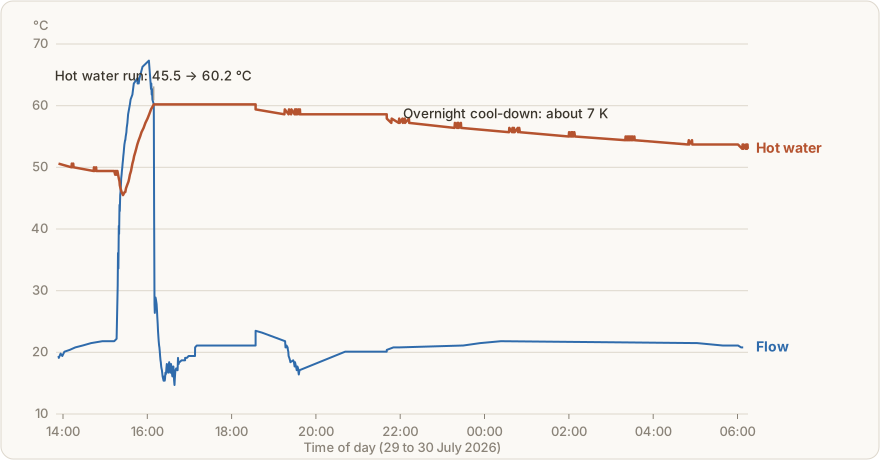
Firmware, register map, hardware docs and a ready-made dashboard are open on GitHub. The whole story, from the gateway failure to the diagnostics, has been running as a series on the blog since mid-August. And because this is a heating system: work on the indoor unit can affect warranty and statutory guarantees and happens at your own risk.
Contact
Got a print idea?
Tell me about it, and together we will turn it into something tangible.