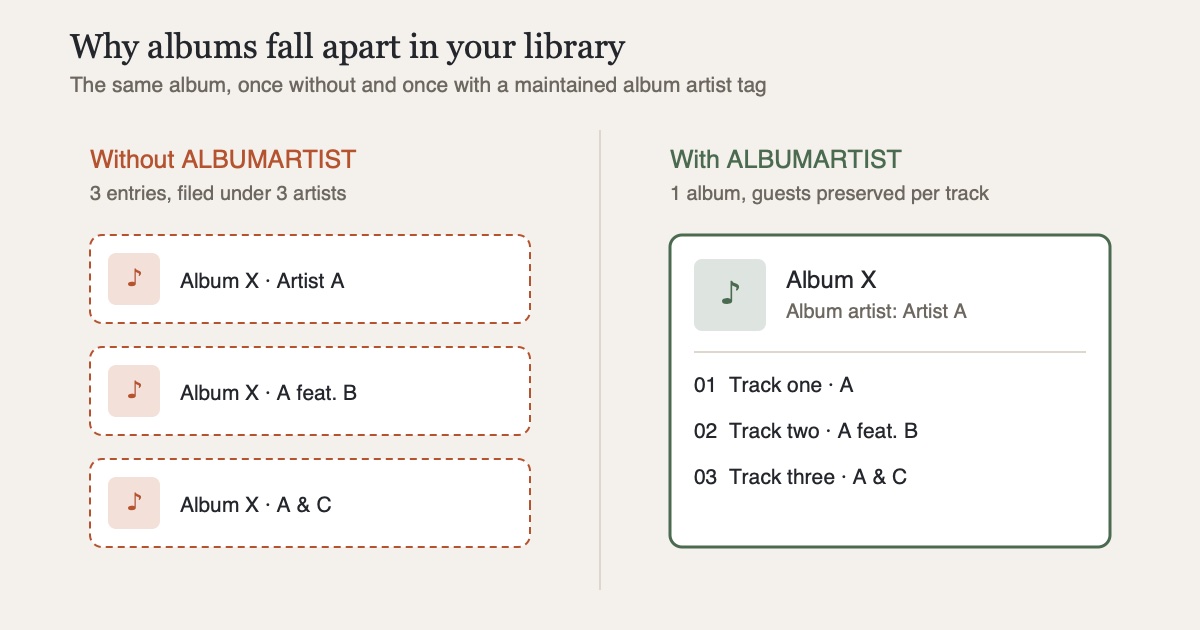
The music server is installed in half an hour - and then this: one album shows up three times, featured guests appear as separate "artists", half the covers are missing. Almost always, the culprit is not Navidrome or Jellyfin but the tags. Modern music servers build the library not from folder names but from the metadata inside the files. Get those right, and you end up with a library that looks like a streaming catalog - except it's yours.
Ground rule: tags beat folders
Navidrome organizes the library exclusively through the tags in your audio files; folder and file names play no role in grouping. Jellyfin merely requires that one folder contains exactly one album - everything else, Jellyfin too reads preferentially from embedded metadata. The consequence: renaming folders fixes nothing. What needs fixing are the tags.
The tags albums break on
Album artist is the most important tag in your collection. If track 3 of an album with guest musicians says "Artist: A feat. B", servers without a maintained album artist will group that file as a separate album of the same name - the album "falls apart". The ALBUMARTIST tag (identical across all tracks, e.g. just "A") holds it together, while the per-track ARTIST tag is still free to name the guests. Navidrome additionally recommends the multi-valued variants ARTISTS/ALBUMARTISTS, which let multiple contributors be recognized cleanly as individual people.
Beyond that, it's worth checking:
- Compilation flag: samplers such as soundtracks don't belong to a single artist. There's a dedicated switch for this - the TCMP frame for MP3/ID3, a
COMPILATION=1tag for FLAC - which Navidrome explicitly evaluates - Disc and track numbers: for double albums, set
DISCNUMBER1/2, otherwise track 1 of disc 1 and disc 2 sort on top of each other - Year and genre: not mandatory, but the basis for any meaningful sorting and for smart playlists
Covers: embed and enclose
For artwork, the safest approach is to do two things in parallel: embed the cover in every file and also place it as cover.jpg in the album folder. Jellyfin takes the embedded image of the first track if no separate one exists; Navidrome has a whole resolution order of artwork sources spanning folder images and embedded covers. Embedded covers have the advantage of traveling with the file - to a friend's device or into a local player. As a rule of thumb, 1000×1000 pixels is plenty; much larger scans needlessly bloat every file.
With Jellyfin, one extra pays off: an image in the root of an artist's folder serves as the artist image in the overview.
Folder structure: for humans, not for the server
Even though the servers don't need it - a clean structure remains mandatory, if only for backups, migrations and your own sanity. The scheme recommended by the Navidrome documentation has proven itself:
Music/
  Artist/
    Album/
      01 - Title.flac
      cover.jpg
Two pitfalls from the Jellyfin documentation: one album per folder (multi-disc albums go into one shared folder, optionally with disc subfolders), and avoid special characters like < > : " / \ | ? * in file names - they cause trouble at the latest when moving to another file system.
The tools
- MusicBrainz Picard (free, macOS/Windows/Linux) matches albums against the MusicBrainz database and writes consistent tags including album artist, compilation flag and cover art - ideal for pulling a messy existing collection through in one go
- Mp3tag (Windows, Mac version) is the tool for targeted batch edits: select a hundred files, change one field, done
A proven workflow: run every new addition through Picard before it enters the collection - then the library stays consistent by itself instead of needing a major cleanup every few months.
Conclusion
A well-maintained collection is not an end in itself: it's the difference between a library you enjoy browsing and a list full of duplicates and "Unknown Artist". The rules are manageable - set album artist consistently, mark compilations, embed covers, stick to one folder scheme. How to get the fully tagged collection onto your iPhone is covered in my posts on Navidrome and Jellyfin. If you'd rather skip the server: CLAUDIO, my privacy-focused player, reads the tagged files straight from the device itself or - with the Ultra subscription or the one-time Pro+ purchase - off a NAS.
Sources
- Navidrome: Tagging Guidelines - organization exclusively via tags, album artist, multi-valued tags, compilation flag
- Navidrome: Artwork location resolution - order of cover sources from folder files and embedded images
- Jellyfin: Music - server documentation - one album per folder, embedded metadata, artist images, problematic special characters
- MusicBrainz: Picard - free, cross-platform tagger powered by the MusicBrainz database
- Mp3tag: official website - batch tag editor for ID3, MP4, FLAC/Vorbis and more