Part 1 of the series "Smart Home in Practice". Parts 2 to 5 bring the heat pump from its vendor cloud to the local hub, Part 6 introduces the home-grown energy management, Part 7 shows how solar, storage and dynamic electricity prices work together, and Part 8 takes stock of 25 automations.
My smart home currently knows 1,744 entities: sensors, switches, lights, thermostats, inverters, door contacts, a greenhouse. The more important fact about this setup is that almost all of it keeps working when the internet goes down. Lights turn on, heating regulates, automations run. That comes from one fundamental decision, and this first part is about it.
The hub: one server instead of twenty apps
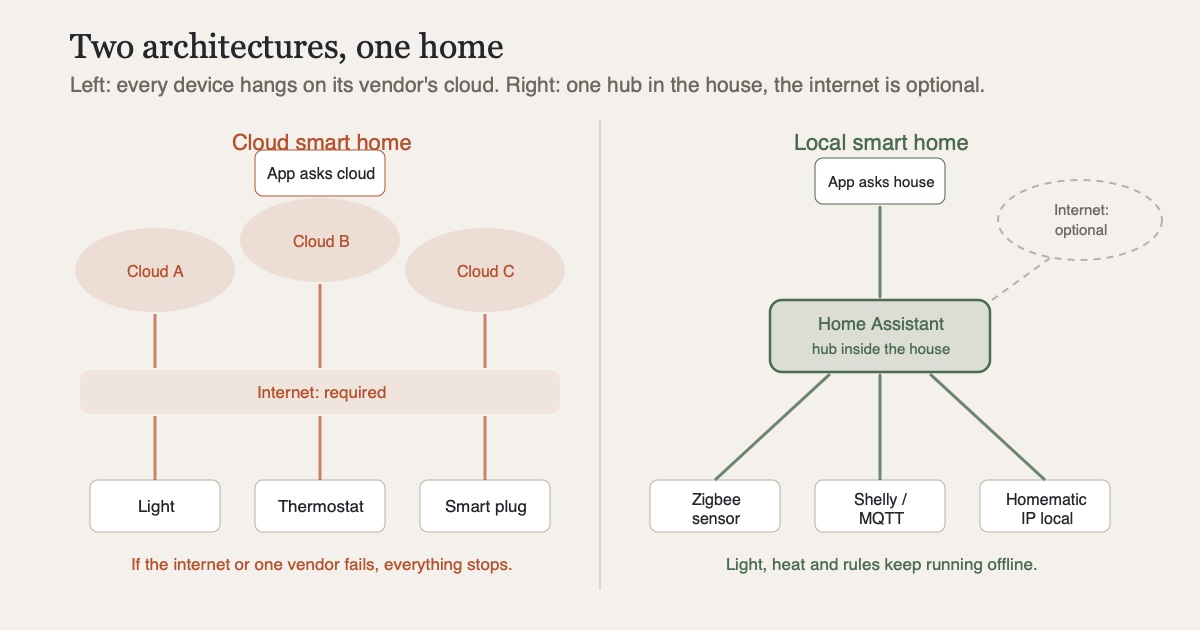
At its heart is Home Assistant, an open-source hub running on a small computer inside the house. It talks to everything that transmits and measures here and unifies it in one interface. Without such a hub, daily life looks different: one app for the lights, one for the smart plugs, one for the heating, one for the vacuum, and each of them talks to its manufacturer's cloud.
That is where the problem starts. A smart home produces intimate data: when you get up, when nobody is home, which room someone moves through in the evening, how much electricity you use and when. In the cloud model, this data leaves the house and ends up on the servers of a dozen companies whose privacy policies nobody reads. In the local model, it stays where it is created.
The second argument: dependency
Privacy is one reason, availability the other. If you buy cloud devices, you buy a promise that the manufacturer will keep its servers running. The most prominent counterexample came in 2022 from smart home pioneer Insteon. The company switched off its cloud overnight and without notice, and working hardware in thousands of homes became useless in an instant. Similar stories have kept coming since, usually more quietly: a manufacturer discontinues the app, suddenly demands a subscription, or removes the interface the device used to be controlled through.
A local setup is immune to all of that. My oldest Zigbee sensor does not even know whether its manufacturer still exists. It transmits to the hub, and that is enough.
The radio layer: Zigbee, Wi-Fi and a bit of Bluetooth
In practice, the setup consists of several layers, all of which stay local:
- Zigbee via the ZHA integration: the workhorse for battery devices such as door and window sensors, motion detectors, temperature probes and wireless buttons. A single USB stick at the hub spans the network; the devices themselves never touch Wi-Fi, let alone the internet.
- Wi-Fi devices with a local API: Shelly modules behind switches and in junction boxes, plus devices running the open-source firmware Tasmota, connected via MQTT. Both talk directly to the hub, no vendor account required.
- Bluetooth via the open BTHome standard: small temperature and humidity sensors that simply broadcast while the hub listens.
- Homematic IP for the radiator thermostats, deliberately in the local variant with its own hub in the house instead of the vendor cloud.
On top of that come community integrations via HACS, the unofficial store for Home Assistant. They play the leading role in parts 6 and 7.
Fully cloud-free is not possible
Claiming a purely local home would be a lie. A few devices in this household still hang on their manufacturer's cloud because there is simply no local path; large-brand home appliances are the typical example. The biggest of these cloud devices was, for a long time, the heat pump; how it ended up on the local hub after its cloud gateway died is the story of parts 2 to 5 of this series. The weather forecast naturally comes from the net, and phone notifications go through push services. What differs is the direction of the dependency. If one of these services fails, I lose convenience at the edges, while the house itself (light, heat, security) keeps running.
This has turned into a simple purchasing rule. Before I buy any new device, I check whether it can be controlled locally. If not, it needs very good reasons. Germany's federal IT security agency BSI recommends checking update support and dependencies before buying smart home devices, and local controllability is the most consistent answer to that.
How to start without needing 1,744 entities
Getting started takes far less than the number above suggests. A Raspberry Pi or used mini PC, Home Assistant on top, a Zigbee stick and two or three sensors are all you need. The system then grows on its own, because every household problem suddenly starts looking like a sensor problem. The hardware matters less than deciding at the start to go local first. It is hard to correct later, because cloud devices you already bought stay cloud devices.
The next part gets concrete. The heat pump, of all things the most expensive device in the house, depended on a vendor cloud until its gateway failed. Why the answer was a 35-euro board and not another cloud is the story of part 2.
Sources
- Home Assistant: project website, the open-source hub this setup is built on
- Home Assistant: ZHA integration, Zigbee on your own stick, no vendor bridge
- Home Assistant: Shelly integration, local connection for Shelly modules
- BTHome: open Bluetooth standard, vendor-independent format for Bluetooth sensors
- HACS: Home Assistant Community Store, community integrations beyond the official catalog
- The Register: Smart home biz Insteon goes silent as cloud services stop, the 2022 cloud shutdown as a cautionary tale
- BSI: Setting up a smart home securely (German), official guidance on purchase and operation