Part 7 of the series "Smart Home in Practice". Part 1 explained why the setup runs locally, parts 2 to 5 brought the heat pump onto the local hub, Part 6 introduced the energy management; Part 8 takes stock of 25 automations.
If a smart home earns real money anywhere, it is here. Switching lights from an app is convenience. The hub from Part 1 only starts paying for itself once it ties together solar power, batteries and hourly exchange prices and decides on its own, every day, where the energy goes.
The ingredients: three roof faces, three batteries, one price
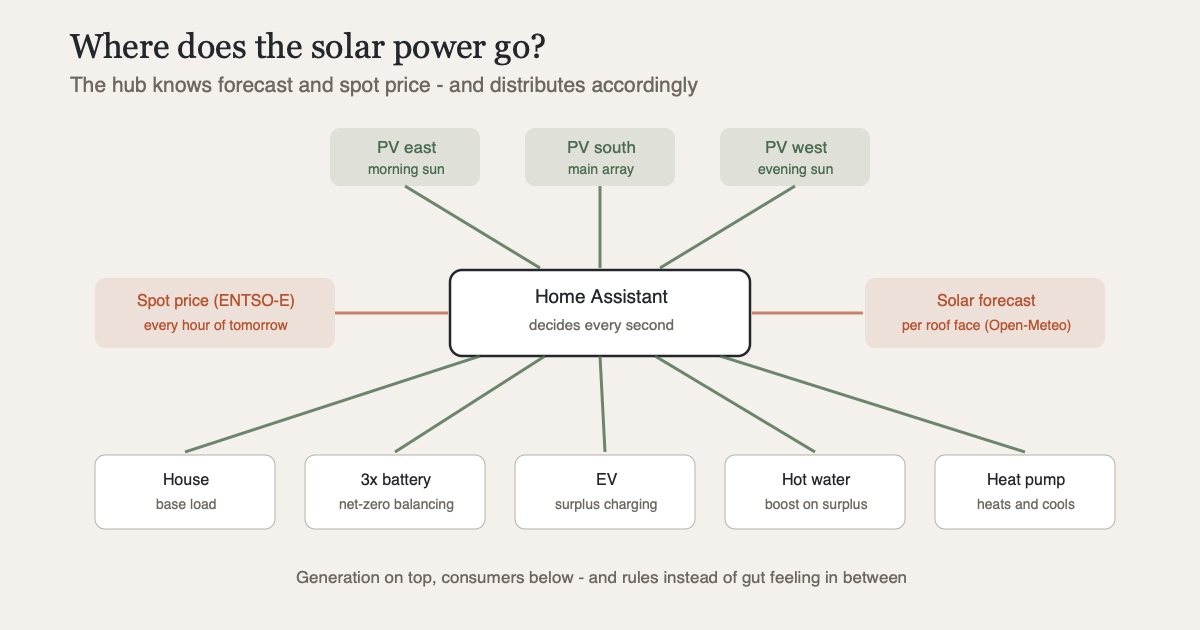
The solar panels sit on three roof faces, facing south, east and west. That flattens the production curve across the day, but it also makes it harder to predict, which is why forecasts matter so much further down. I don't read the SolarEdge inverter through the vendor cloud. It is connected locally via Modbus TCP, with readings every few seconds and without a single byte leaving the house. A small APsystems array adds to that.
For storage I went an unusual way: three Zendure Hyper 2000 units, plug-in batteries totaling a good 11.5 kWh, integrated locally through a community project. Home Assistant runs them as a group, and I don't need the vendor app for it.
The third ingredient is the price. Through an ENTSO-E integration, the hub knows the day-ahead prices from the European transparency platform for every hour of the next day. Whether dynamic tariffs are worth it in general, and for whom, I covered in a separate article. This one is about what my smart home does with them.
Net-zero balancing: the meter should read zero
The storage control is built around an automation with the sober name "balance control". A meter at the grid connection reports every second whether the house is importing or exporting. The hub adjusts the three batteries so that this balance stays as close to zero as possible, sending surplus into the packs and covering demand from them. That sounds easy. With three devices working as a group, though, it turns into a tricky control problem. Who charges first, who discharges first, what happens at full load, and how do you keep the loop from oscillating?
That's why the batteries have to be connected locally. A control loop that has to react every second can't run through a manufacturer's cloud on another continent.
Forecasts: knowing today what the roof delivers tomorrow
Besides the price, the hub needs the solar forecast. Open-Meteo provides a separate production forecast for each roof face, south, east and west. With price and forecast together, the control can plan ahead. If plenty of sun is forecast for tomorrow noon, the battery doesn't need a full overnight charge from the grid, even if power is cheap at night. If a gray week is coming, it pays to top up in the cheapest night hour.
The automations: car, hot water, heat pump
On top of that, a handful of automations handle the big consumers:
- Solar surplus charging for the EV: the automation detects a car at the plug and sets the charging current according to the surplus, so more sun means faster charging. If the home battery drops below a minimum charge, a safety automation stops it. The car is meant to get the surplus, not use up the house's reserve.
- Hot water as a battery: if the roof produces more than the house and the packs can absorb, the heat pump heats the domestic water beyond comfort temperature. That turns the hot water tank into one more energy store. A built-in legionella protection makes sure the hygiene cycle still runs regularly, and the boost stays off at night.
- Heat pump by outdoor temperature and flow curve: the hub switches between heating and cooling and adjusts the flow temperature. In summer the underfloor circuits even cool, governed by a PID thermostat in each room.
- Bookkeeping on the side: utility-meter helpers automatically split the heat pump's consumption into heating, cooling and hot water. It's pure admin, but at the end of the year it shows me where the kilowatt-hours actually went, and Home Assistant's energy dashboard turns it into charts.
What this system is not
None of this is an off-the-shelf product, and that comes at a cost. The building blocks come from the official catalog, from HACS and from GitHub repositories. I built the logic myself, and it needs maintaining. If you want something that runs without maintenance, a commercial home energy management system will serve you better. But for understanding where your energy goes, and why millions of such flexible households matter for the grid as a whole, a construction kit like this is hard to beat.
The eighth and final part is about everyday life. I go through my 25 automations and look at which ones proved themselves and which are just gadgetry.
Sources
- ENTSO-E: Transparency Platform, official day-ahead prices of the European power exchanges
- GitHub: hass-entso-e, community integration for ENTSO-E prices in Home Assistant
- Open-Meteo: weather and solar API, free forecast data behind the production prediction
- GitHub: home-assistant-solaredge-modbus, local inverter connection via Modbus TCP
- GitHub: Zendure-HA, integration of the Zendure batteries into Home Assistant
- Home Assistant: Home Energy Management, the energy dashboard