Part 8 and conclusion of the series "Smart Home in Practice". Part 1 made the case for local architecture, parts 2 to 5 brought the heat pump onto the local hub, Part 6 introduced the energy management, Part 7 showed the energy setup.
My Home Assistant currently runs 25 automations. For 1,744 entities that sounds like few, but the number of automations tells you nothing about the quality of a setup. In my experience, good setups get by with a few robust rules that you eventually forget are there. In this post I go through what has worked for me and what stayed a gadget.
The quiet helpers: light that is simply there
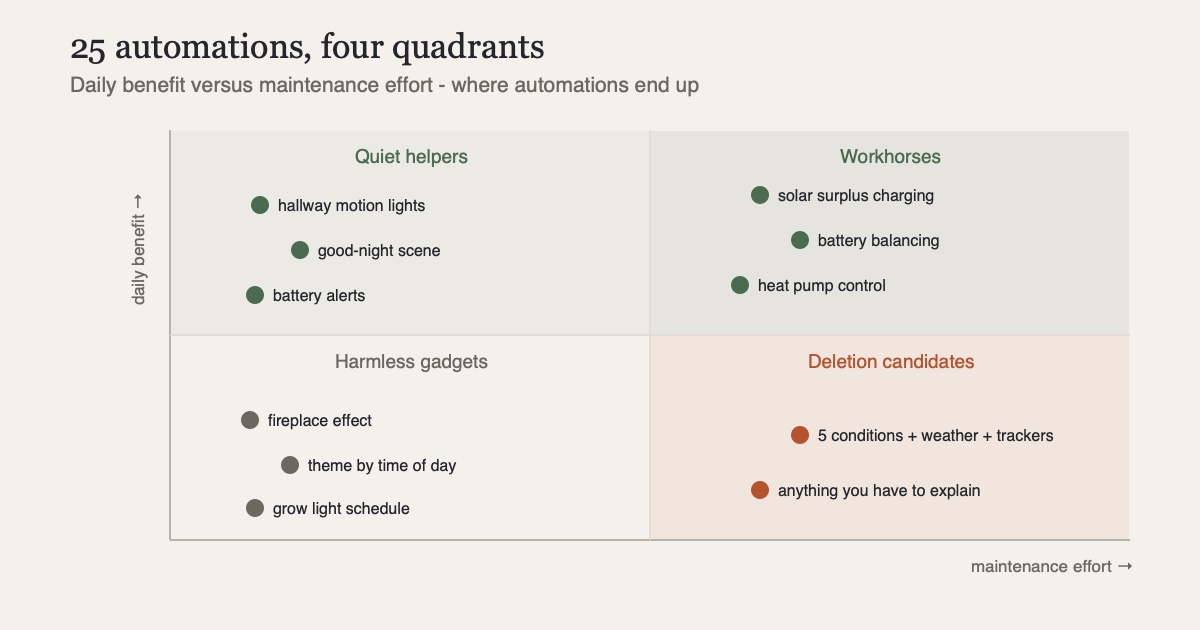
The automations that do the most are the ones nobody thinks about. Four of them switch lights on motion, in the kitchen, the dining room and the upstairs and downstairs hallways. You would only notice them if they were missing. Walk through the stairwell at three in the morning with your hands full, and the light is just on. Saving that one small step a thousand times over is worth more to me than any gimmick.
The real work is in the conditions. The automation "Hallway: light off in the morning" exists because motion lighting in daylight makes no sense. Exceptions like this pile up over time, and behind each one is a small annoyance someone in the household had.
One button for everything: the good-night scene
Then there are scenes at the push of a button. The one used most is "Good night": one press on the wireless button by the bed and the house goes into night mode, with lights and plugs off. Several rooms also have their own wireless switches for the ceiling lights, and the kids have theirs too.
So the physical switches stay. A smart home that only works through an app or by voice fails with guests, with children and with anyone in a bad mood. Every important function here also has a button you can press without knowing anything about the system. The automation is a shortcut on top of it.
Where the money works
The energy automations from Part 7 add up to about half a dozen: surplus charging, battery balancing, hot water boost and heat pump control. They are the most complex ones I have and the only ones with a measurable return. They also took more development time than all the others combined, and they are the only ones I regularly have to go back to, because tariffs, devices and interfaces keep changing.
Maintenance that reports itself
Automations that look after the system itself are easy to underrate. A good hundred devices here run on batteries, from door sensors to wireless buttons. The community extension Battery Notes knows for every device which battery type goes in and when it was last changed, and it speaks up before a sensor silently dies. Updates work the same way: the hub currently counts 121 pending or available updates across all devices. Without automation I would lose track of both.
Past a certain size, then, the smart home itself needs monitoring. If only comfort is automated and maintenance isn't, devices drop out one by one without anyone noticing.
The gadgets - and why they get to stay
And then there are the gadgets. A "fireplace effect" makes lamps flicker like a fire. It's useless, and it's a joy. The grow light in the greenhouse switches on a schedule, half gadget, half serious, and the plants are happy. Another automation changes the dashboard's color theme with the time of day. Things like these are what make the hobby fun for me, and they cost nothing. They are simple, they can't break anything, and nobody depends on them.
The trouble comes from the ambitious ones: automations with five conditions, three person trackers and a weather dependency that do something surprising twice a month. I had some of those too. They're deleted now, and the household is happier for it.
What I would tell someone starting out
First, go local, for the reasons in Part 1. That architecture decision is hard to undo later. Second, start with the quiet helpers, not with energy management, because a motion light in the hallway wins over the household more than any dashboard. Third, every automation needs a way to override it by hand, or it soon becomes a nuisance. And fourth, watch first and automate second. Home Assistant's automation documentation is quick to learn, but you only find out which rules a household actually needs after watching for a few weeks.
With 1,744 entities and 25 automations, this has become more housekeeping than tech project for me. Devices and integrations will keep changing. What I'm sticking with is understanding the system and running it myself.
Sources
- Home Assistant: automation documentation - triggers, conditions and actions in detail
- GitHub: HA-Battery-Notes - battery types and replacement dates for hundreds of devices
- GitHub: Magic Areas - room-based building blocks for presence and lighting
- HACS: Home Assistant Community Store - source of the community extensions mentioned