App
Quadrivium: Futoshiki and Three More Logic Puzzles
Quadrivium is a Futoshiki app that shares its grid with three more logic puzzles: Skyscrapers, Magic Square and Calcudoku. I build it on my own, for iPhone and iPad, in the same spirit as Sudoku Pro: pay once, no subscription, no ads, no account. Every puzzle is generated when you start it and can be solved with the techniques of its level, without guessing anywhere along the way.
What it looks like
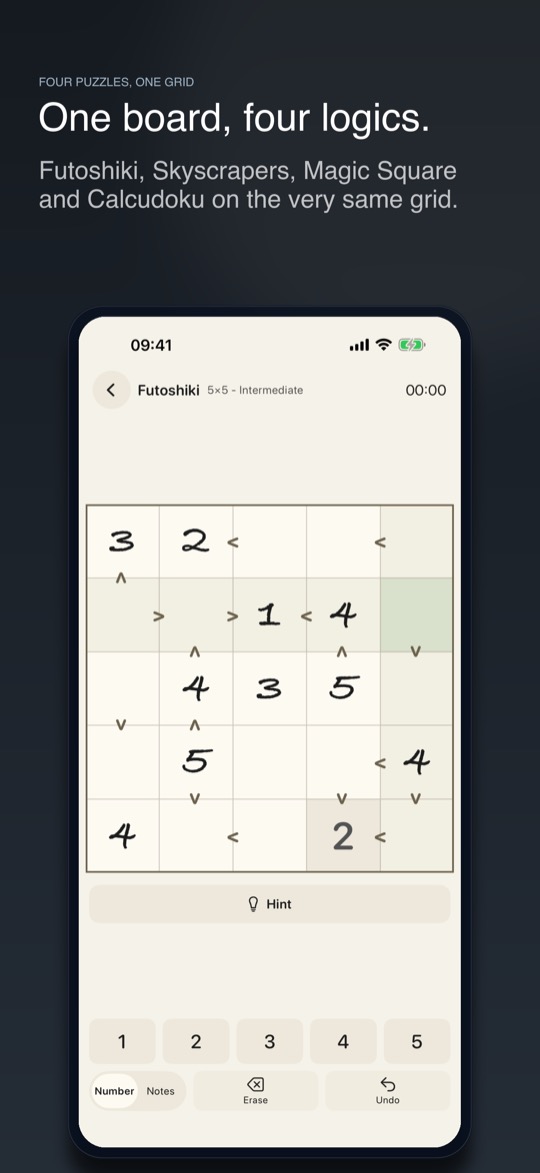
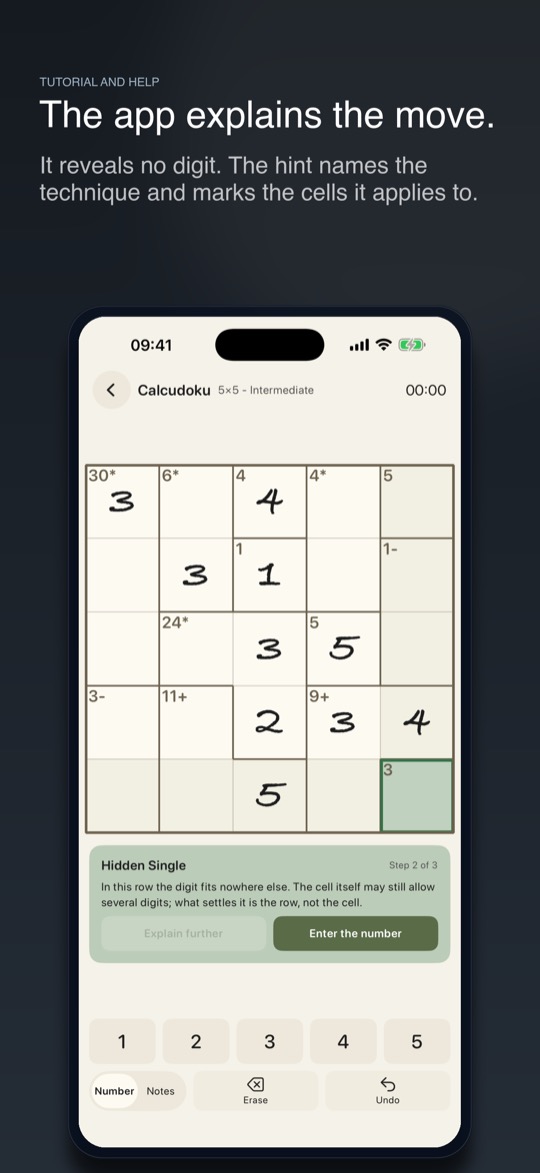
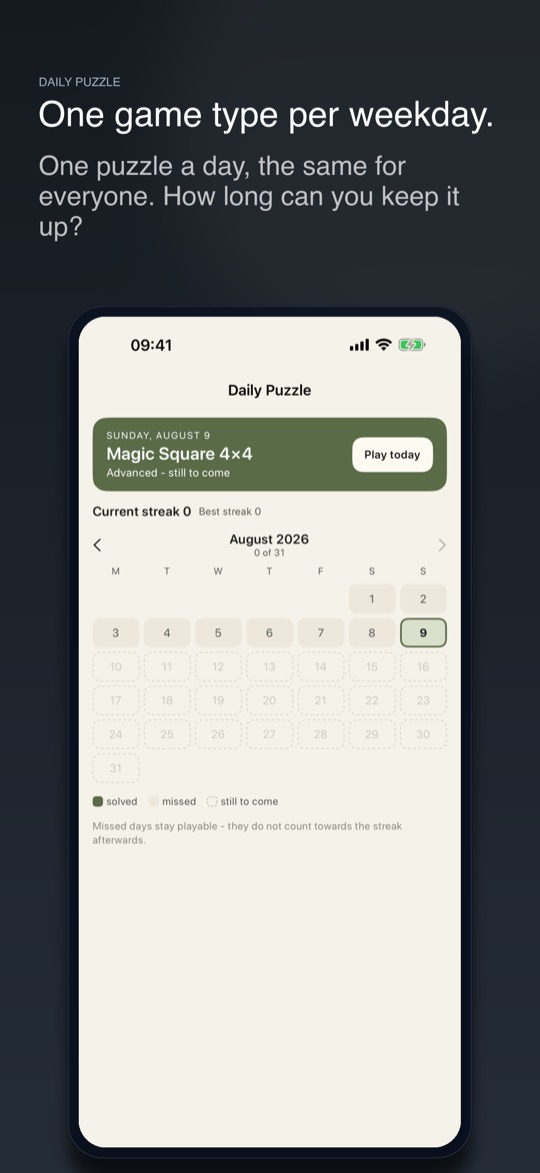
Futoshiki, Skyscrapers, Magic Square, Calcudoku
All four puzzle types share the same square board and the same basic rule: every digit appears once in each row and once in each column. What sets them apart is the clue around the grid.
In Futoshiki, signs between two cells tell you which of the pair is larger. In Skyscrapers, every digit is the height of a building, and the number on the edge says how many buildings are visible from there - lower ones disappear behind taller ones. In the Magic Square, every number from 1 to 9, or from 1 to 16, appears exactly once, and every row, every column and both diagonals add up to the same sum. In Calcudoku, cells are grouped into cages whose digits have to reach a target with the given operation; inside a cage, a digit may repeat.
If a puzzle type is new to you, the app explains the rule and lets you try it on three cells before the first full board.
Choose the size, the level and the operations
Futoshiki, Skyscrapers and Calcudoku come in 4x4, 5x5 and 6x6, the Magic Square in 3x3 and 4x4. There are four levels on top: Beginner, Intermediate, Advanced and Expert, with Expert offered from 5x5 upwards. For Calcudoku you can also decide which operations appear and how large a cage may grow.
The board is not drawn from a list but built when you start. That means the supply never runs out, and a favourite combination of type, size and level can be played as often as you like. After a win, the app shows how your time compares to your best and offers the next puzzle at the same level right away.
A hint that names the rule, not the number
Getting stuck does not hand you a joker that fills in a digit. The hint names the rule that applies at this point and marks the cells it applies to: a Hidden Single, for example, the Neighbour Bound in Futoshiki, the Height Limit in Skyscrapers or Cage Combinations in Calcudoku. The explanation comes in steps. Only when you tap Explain further do you see more, and at the end you enter the number yourself or let the app do it.
If a wrong number is sitting on the board, the hint points it out, because as long as it stays there, every rule is working with something false. The number is taken out, and the right one is still yours to find. Only when no rule gets any further does the app reveal a cell.
In the settings you can stop mistakes from being marked immediately, and dim the digits on the number pad that are already used up. Notes for a cell's candidates work in all four puzzle types.
Logic puzzles without guessing
Every puzzle Quadrivium builds can be solved with the techniques of its own level: no guessing, no dead ends, no moment where trial and error is the only way forward. With freshly generated puzzles, that is not a given. A grid with plenty of clues is not automatically unique, and a puzzle with two solutions cannot be finished by logic.
How to build logic puzzles with exactly one solution, and the traps along the way, is in the post Building Logic Puzzles With Exactly One Solution. The script described there is the reference for Quadrivium.
The daily puzzle: one type per weekday
There is one puzzle a day, the same for everyone, and each weekday belongs to a different puzzle type. A calendar shows the month at a glance: solved, missed, still to come. Missed days stay playable, but they do not count towards the streak afterwards. Your current and best streak sit right above.
If you don't want to forget the daily puzzle, a reminder arrives once a day at a time you choose.
Colour worlds, statistics and a newspaper world on iPad
Ten colour worlds are available, from Paper and Slate to Forest, Midnight, Ember and Moss. On iPad, Quadrivium has a newspaper world of its own instead of simply stretching the iPhone layout.
The statistics keep track of every board the app offers: which combination of type, size and level you have already solved and which are still open. On top of that come ten achievements, from the first win to a puzzle without mistakes or hints, all the way to thirty daily puzzles in a row. All of it lives in the app itself, no sign-in required.
No account, no ads, 45 languages
Quadrivium needs no account, shows no ads and tracks nobody. What you play stays on your device, and everything runs offline.
I build the app on my own: every rule, every hint, and the translation into 45 languages. No studio behind it, no subscription. Write to me and a person answers.
Frequently asked questions
What is Futoshiki? A number puzzle from Japan on a square grid. Every digit appears once in each row and column, and signs between neighbouring cells tell you which of the two holds the larger number. The name roughly means “not equal”.
What is Calcudoku? A grid in which cells are grouped into cages. Each cage carries a target and an operation, such as 11+ or 6*, and its digits have to reach that target with it.
How is the app different from Logic Squares in the browser? Logic Squares runs the same four puzzle types for free in the browser, from a fixed set of 80 puzzles checked in advance. The app generates every puzzle fresh, lets you choose size and level, has a daily puzzle and explains the next step.
Do I need an internet connection? No. Puzzles, hints, statistics and the daily puzzle all work offline.
What does Quadrivium cost? You buy the app once on the App Store. After that there is no subscription and no advertising.
Related
Quadrivium: Logic Squares is on the App Store as a one-time purchase, no subscription.